
An MCP server for Google Ads lets Claude or ChatGPT read your account directly, so you can ask why CPA jumped last week and get an answer from live data. There are now dozens of these servers, and most roundups list ten or more without saying which one to install.
I narrowed it to six. HYPD, Google’s own open-source server and Supermetrics take the top three spots. PaidSync, Adalysis and the open-source cohnen/mcp-google-ads follow, each for a narrower kind of user.
Table of Contents
The short version: HYPD for most accounts, Google’s server if you self-host
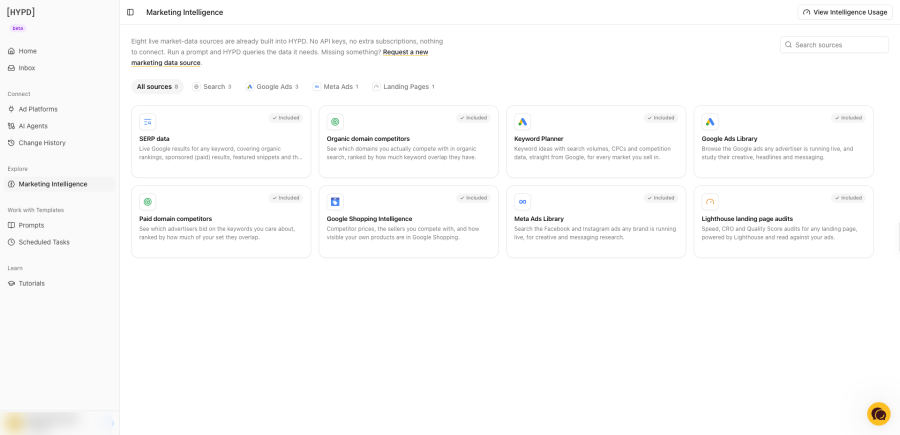
HYPD is the best MCP server for Google Ads for most advertisers in 2026. It has a free plan for 1 account, connects with a Google sign-in, and every change the AI proposes waits for your approval and can be reverted. Google’s official server is the pick if you want free, open-source software running in your own Google Cloud project and can handle the setup. Supermetrics comes third and only makes sense if you already pay for it, since the cheapest plan is $59 a month.
HYPD vs Google’s official server vs Supermetrics at a glance
| 1. HYPD | 2. Google Ads MCP server (official) | 3. Supermetrics MCP | |
|---|---|---|---|
| Price | Free for 1 account. Paid from $19.99/month | Free, open source | From $59/month ($44 billed annually). No free plan |
| Setup | Google sign-in. No Cloud project | Your own Google Cloud project, OAuth client, pipx or Cloud Run | Supermetrics login, then OAuth |
| Hosting | Hosted by HYPD in the EU | Self-hosted | Hosted by Supermetrics |
| Can it change campaigns? | Yes, off by default, switched on per account | Labels and assets only (since v0.0.6). No budgets, bids or keywords | Yes: create, update and pause campaigns |
| Approval before a change | Every change is drafted, approved in chat, logged and revertible | Two-step validation call, enforced only by the AI model | New campaigns are created paused. No approval step documented for edits |
| Platforms | 9, including Meta Ads, GA4, Search Console and Merchant Center | Google Ads only | 13 named on the MCP page, more in the connector list |
| Works in | Claude, ChatGPT, Cursor, Claude Code | Gemini locally. Claude and ChatGPT through a Cloud Run deployment | Claude, ChatGPT, Copilot, n8n |
| Best for | Most advertisers and small agencies | Developers who want full control | Teams already on Supermetrics |
How I ranked the servers
I ranked the servers on four things: what it costs to start, how long setup takes for someone who isn’t a developer, what stops the AI from changing a live campaign without you, and how many other platforms come with it.
Safety carried the most weight, because a reporting mistake costs you ten minutes and a budget change you didn’t approve costs money.
One limit on this ranking: I’ve run the Google Ads account for a Canadian exam-prep site I own through HYPD since late October 2026. I haven’t run the other five on a live account, so their sections rest on what each vendor or project publishes.
1. HYPD: best for most advertisers
Verdict: the easiest server to set up, with the strictest controls on changes, and the only one of the three with a free plan that needs no Cloud project.
HYPD is a hosted MCP server that connects Google Ads and eight other platforms (Merchant Center, Google Analytics, Meta Ads, LinkedIn Ads, Microsoft Ads, Search Console, TikTok Ads and Tag Manager) to Claude and ChatGPT. Its Google Ads MCP page lists 40+ Google Ads tools covering reporting, change drafts, keyword research and landing page checks.
Price. Free Forever covers 1 account with daily usage limits. Starter is $19.99 a month for 3 accounts, Plus is $59.99 for 10, Pro is $119.99 for 50 and Agency is $279.99 for 250, per the HYPD pricing page on November 11, 2026. Paid plans come with 14 days free and no credit card.
Setup. You sign in with Google and pick the accounts. In Claude you add HYPD from the connector directory. ChatGPT, Cursor and Claude Code take a server URL. There’s no Google Cloud step at all.
Changes. HYPD is read-only until you turn write access on for a specific account. After that the AI drafts each change and shows it in the chat, and nothing goes live until you approve it. Approved changes are logged and can be reverted. HYPD says the AI never calls the Google Ads API itself. The change runs through HYPD’s own logic, which also checks things like whether a campaign is actually spending its budget before it suggests raising it.
Where it loses.
- You can’t self-host it. Your account access sits with a vendor, which is exactly what Google’s server avoids.
- The free plan has no keyword, SERP or competitor research. Those start at $19.99.
- Hosted servers face an open question under Google’s developer policy, covered below.
2. Google Ads MCP server: best free, self-hosted option
Verdict: the right choice if you want open-source code running on your own Google Cloud project and you’re comfortable with OAuth clients and config files.
Google’s official Google Ads MCP server is a free, open-source Python server that Google released in October 2025. Google’s developer guide documents three tools: one lists your accounts, one runs Google Ads Query Language (GAQL) reports, and one describes the fields each resource has.
Price. $0. You pay only for Cloud Run if you deploy it there.
Setup. You need a Google Cloud project with Google Ads API access and either an OAuth client or application default credentials. Developer tokens are no longer required (Google’s guide says they were sunset on September 9, 2026). Locally it runs through pipx. To use it from Claude or ChatGPT you deploy it to Cloud Run and add it as a custom connector with your own OAuth client.
Changes. This is the part most comparisons have wrong. Google’s guide, last updated October 30, 2026, still calls the server strictly read-only. But PPC Land reported on November 9, 2026 that version 0.0.6, released November 2, added four write tools for creating assets, uploading video assets and managing labels. They are on by default.
The server still can’t touch budgets, bids, keywords or campaign status. If you approved it as a read-only tool, set labels: false and assets: false in tools_config.yaml.
Where it loses.
- Setup is a developer job. Most site owners will stall at the Cloud project.
- It only covers Google Ads, so you get no Analytics, Search Console or Meta data.
- There is no approval layer. PPC Land notes the two-step check on the new write tools is an instruction to the AI model, with nothing on the server holding a change until a person approves it.
- Agencies get no way to set permissions per client.
3. Supermetrics MCP: best if you already pay for Supermetrics
Verdict: a capable server attached to an expensive reporting product. It’s worth switching on if you have a subscription and hard to justify buying for this alone.
Supermetrics MCP is a hosted MCP server included with any Supermetrics subscription. It gives Claude, ChatGPT, Copilot and n8n access to the marketing data sources you’ve connected in Supermetrics, Google Ads among them.
Price. Starter is $59 a month, or $44 billed annually, and includes 2 data sources, 2 accounts per source and 1 destination, per the Supermetrics pricing page on November 11, 2026. Claude or ChatGPT counts as that destination. Growth is $222 a month for 7 sources. There is no free plan, only a 14-day trial.
Setup. Log in to the Supermetrics hub, add the MCP endpoint to your AI client and authorize with OAuth. You don’t need a Cloud project.
Changes. Supermetrics’ documentation says the server can create campaigns, update budgets, and pause or enable campaigns on Google Ads, Meta, Microsoft Ads and TikTok. New campaigns are always created paused so you can review them. The docs don’t describe an approval step or a revert for edits to campaigns that are already live.
Where it wins. Supermetrics lists SOC 2 Type II and ISO 27001, and it reaches sources the other two don’t, like HubSpot, Salesforce, Shopify and Klaviyo.
Where it loses.
- $59 a month for 2 data sources, against $0 for Google’s server and $0 to $19.99 for HYPD.
- Sources and accounts are capped per plan, so the bill climbs as you add platforms.
- Less is documented about what stands between the AI and a live budget.
Options 4 to 6 at a glance
PaidSync, Adalysis and cohnen/mcp-google-ads rank below the top three because each fits a narrower user. PaidSync is built for heavy write access, Adalysis only works with an existing subscription, and cohnen/mcp-google-ads is a community project.
| 4. PaidSync | 5. Adalysis MCP | 6. cohnen/mcp-google-ads | |
|---|---|---|---|
| Price | Free for 15 calls/month. Paid from $49/month | Needs an Adalysis subscription, from about $126/month | Free, open source |
| Hosting | Hosted by PaidSync | Hosted by Adalysis | Self-hosted |
| Can it change campaigns? | Yes, creation and edits are the main pitch | No, read-only | Built for analysis. Some forks add writes |
| Platforms | Google, Meta, LinkedIn and TikTok ads, plus GA4, Tag Manager and Search Console | Google Ads | Google Ads |
| Best for | Operators who want the AI to build and edit campaigns | Teams already paying for Adalysis | Developers who want to read and modify the code |
4. PaidSync: most write tools, capped by calls
Verdict: the one to look at if you want the AI to build and edit campaigns across several ad platforms, and you can live with a monthly cap on calls.
PaidSync is a hosted MCP server built around write access. Its directory listing describes campaign creation and edits on Google Ads, Meta, LinkedIn and TikTok, with GA4, Tag Manager and Search Console alongside. One listing counts 126+ tools for Google Ads alone.
Price. Free for 15 calls a month. Plus is $49 for 150 calls, Pro is $99 for 600 and Max is $199 for 4,000, per PaidSync’s listings on mcpservers.org and Glama on November 11, 2026.
Setup. Sign up, connect your ad accounts with OAuth, then paste your PaidSync server URL into Claude, ChatGPT or Cursor.
Changes. This is what PaidSync sells. The listings show prompts like raising budgets on your top campaigns in one message. I couldn’t find a documented approval step or a revert log in those listings, so ask about both before pointing it at a live budget.
Where it loses.
- Calls are metered. 15 free calls is roughly one audit, and $49 buys 150.
- The server URL carries your API key, so treat that URL like a password.
- PaidSync’s own listings quote anywhere from 210+ to 430+ tools depending on the page. Check the current docs for what applies today.
- It’s hosted, so the Google developer policy question below applies.
5. Adalysis MCP: best for existing Adalysis users
Verdict: read-only analysis backed by Adalysis’s own PPC logic. Worth adding if you subscribe, not a reason to subscribe.
Adalysis MCP is a read-only MCP server that gives ChatGPT and Claude your live Google Ads data together with the analysis and recommendations Adalysis already produces. Adalysis announced it on September 10, 2026, with over 27 tools.
Price. Adalysis’s post lists no separate MCP price. Adalysis itself is priced by monthly ad spend, starting at about $126 a month on Capterra’s listing, and the post offers a 30-day free trial.
Setup. Add the server address as a connector in Claude or ChatGPT. There is no API key, and Adalysis says it takes about two minutes. The AI sees the same accounts you can already see in Adalysis.
Changes. None. Adalysis MCP can’t change your Google Ads account.
Where it loses.
- You need an Adalysis subscription first.
- It’s read-only, so every fix still happens in Adalysis or Google Ads.
- The announcement covers Google Ads only.
6. cohnen/mcp-google-ads: the community open-source option
Verdict: free and self-hosted like Google’s server, without Google maintaining it.
cohnen/mcp-google-ads is an open-source MCP server by Ernesto Cohnen that connects the Google Ads API to Claude, Cursor and Windsurf for campaign, keyword and performance analysis. It dates from March 2025, about seven months before Google released its own server, and SourcePulse lists it at around 620 GitHub stars.
Price. $0.
Setup. Clone the repository and run it with your own Google Ads API credentials. That is a developer job, the same as Google’s server.
Changes. The project is built for reading and analysis. Several forks add write tools on top of it.
Where it loses.
- It has one maintainer and no support.
- Google’s official server now covers the same ground with Google behind it, so I’d only pick this to study the code or because a fork adds something you need.
- Forks with write access hold the keys to your ad account. Read the code before you give one your credentials.
The red flag for any hosted server: Google’s developer policy
Google’s Google Ads API developer policy prohibits third-party hosted MCP servers that only wrap or re-expose the Google Ads API. The policy calls this a “programmatic proxy”. It allows open-source tools that you download and connect with your own credentials, which is how Google’s own server works.
HYPD, Supermetrics, PaidSync and Adalysis are all hosted, so all four have to answer this. Each does more than pass API calls through, but whether that satisfies the policy is Google’s call, and I haven’t seen Google rule on any named product.
Before you connect a hosted server to an account you depend on, ask the vendor one question: whose Google Cloud project and API access do my requests run through?
Which Google Ads MCP server should you pick?
Pick HYPD if you run your own ads or a handful of client accounts and want to be asking questions in Claude or ChatGPT today. Start on the free plan and leave write access off until you trust the answers.
Google’s official server is the one for you if you have a developer, want nothing hosted by a third party, and mainly need reporting. Turn the new write tools off unless you want them.
Supermetrics only makes sense if the subscription is already on your card. Otherwise it’s $708 a year for something the other two do for less.
The last three are for narrower cases. PaidSync suits you if building and editing campaigns by chat is the whole point and the call caps fit your volume, Adalysis MCP if you already subscribe to Adalysis, and cohnen/mcp-google-ads if you want community code you can read and change.
Whichever you choose, fix your conversion tracking first. An AI reading bad conversion data gives confident, wrong advice. If Google Analytics is the weak link, I compared Google Analytics alternatives for conversion tracking here.
FAQs about Google Ads MCP servers
Does Google have an official MCP server for Google Ads?
Yes. Google released the open-source Google Ads MCP server in October 2025 and maintains it on GitHub under googleads/google-ads-mcp. The Google Ads MCP server is free and runs on your own machine or your own Google Cloud project.
Can an MCP server change my Google Ads campaigns?
It depends on the server. HYPD can draft budget, bid, keyword and status changes that only run after you approve them. Supermetrics MCP can create, update and pause campaigns. Google’s official server can only create assets and manage labels as of version 0.0.6, and can’t change budgets, bids or keywords.
Is there a free MCP server for Google Ads?
Yes, several. Google’s official Google Ads MCP server is free and open source but needs a Google Cloud project. HYPD has a Free Forever plan for 1 account with daily usage limits and no Cloud setup. PaidSync has a free tier capped at 15 calls a month, and cohnen/mcp-google-ads is free and open source. Supermetrics and Adalysis have no free plan.
Do I need a developer token to use a Google Ads MCP server?
No. Google’s guide says developer tokens were sunset on September 9, 2026, and the official Google Ads MCP server now needs a Google Cloud project with Google Ads API access instead. Hosted servers like HYPD and Supermetrics use a normal Google sign-in.
Is it safe to connect Google Ads to Claude or ChatGPT?
Connecting Google Ads to Claude or ChatGPT is as safe as the server in between. Google publishes a single OAuth scope for the Google Ads API with no read-only version, so read-only behavior always comes from the server’s own code. Check three things before connecting: whether write access is off by default, whether a person approves each change, and whether changes are logged and can be reverted.
